
This data presents an analysis of accounting software usage globally, not just in our market. We publish unbiased commentary; our opinions are our own and are not influenced by payments from advertisers.
Read also: Technology and tools.
Easily track your business finances.
Accounting software is used by individuals and business owners to record income and expenses and to track their finances. It is more efficient and makes fewer mistakes than manual processing. It can also save time with features like automation and provides the owner with a place to store important documents and invoices for access at any time. If accounting isn't your strong suit—or even if it is and you want to save time—read on to see which accounting program is right for your business.
To determine the best accounting software, we researched more than 20 programs and applications before selecting the top eight. We selected these based on features and functions specifically designed for small business owners, ease of use, cost, and more.
Here are our top picks.
The 8 Best Accounting Software for 2021
- Best overall: Intuit QuickBooks
- Runner-up: FreshBooks
- Best for multiple users: Sage Business Cloud Accounting
- Best for experienced accountants: AccountEdge Pro
- Best value: Wave Accounting
- Best additional features: Xero
- Best for e-commerce businesses: Godaddy
- Best for automation: Zoho Books
The best accounting software
Best Overall
Intuit QuickBooks
:max_bytes(150000):strip_icc()/Quickbooks-39bd4fe829a543d5b3cb3b89bea2310e.jpg)
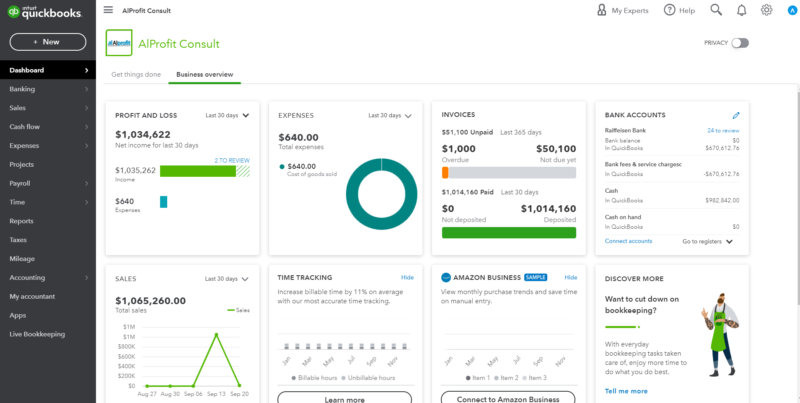
QuickBooks is accounting software developed and marketed by Intuit. Its most recent cloud-based release was in 2019, but it also offers standalone desktop options that you can purchase and download. Its products are typically aimed at small and medium-sized businesses, and over seven million businesses use this software.
We chose it as the best solution for the top accounting software because it's easy to use for business owners with no accounting experience. It's also quick to set up, reasonably priced, and offers tools and features that are useful for small business accounting. It keeps everything organized in one place and keeps your business tax-ready year-round.
QuickBooks features include:
- Integration of financial institutions, as well as integration with PayPal, Square, Shopify, and more.
- Assist with filing quarterly and annual tax returns using user guides and exporting tax data.
- Sales tax calculations, returns, and recorded tax payments
- Automatically categorize transactions and expenses into tax categories.
- Track expenses in one place.
- Scan the invoices and attach them to the invoices.
- Share with your accountant or export documents.
- Create personalized reports with visible cash flow tracking on your dashboard.
- Track your mileage with your smartphone's GPS.
QuickBooks prices by plan
QuickBooks offers tiered pricing so you can choose the plan that best fits your needs:
- Simple start: $25 per month for businesses just getting started.
- Essential: $50 per month for managing growing businesses, with up to 3 users.
- Plus: $80 per month to help you better organize and manage projects, inventory, and contractors, with up to 5 users.
- Advanced: $180 per month to help your business grow with analytics, deeper insights, exclusive applications, automated workflows, and a dedicated support team, with up to 25 users each receiving personalized access.
Contact QuickBooks directly to see which specific features are included in each level.
Runner-up
FreshBooks
:max_bytes(150000):strip_icc()/FreshBooks-6825baed274b4ca7915aec101d19a819.jpg)
FreshBooks is a Canada-based company founded in Toronto in 2003. It uses cloud-based accounting and invoicing software accessible through iPhone, Android, and iPad apps.
It's our pick for the best overall accounting software because it's easy to use for business owners with little or no accounting experience, offers powerful features and helpful functions, is reasonably priced, and can be used on the go.
FreshBooks features include:
- Payment reminder
- Recurring invoices with customizable options, including dates and discounts.
- Online payment by credit card
- Multi-currency and multi-language billing
- Automatic tax calculations for sales tax
- Tax-friendly expense categories
- Remembered Sellers
- Time tracking with a Chrome browser extension
- Bank deposits, recurring payments, and vehicle invoices with bank integration
- Tax assistance with tax applications, assessments, deductions, and filing tools.
- Integrates easily with other products, including GSuite and Gusto.
The FreshBooks pricing is as follows:
- Lite: $15 per month for a self-employed business owner with five billable clients.
- Plus: $25 per month for businesses with 50 billable clients.
- Premium: $50 per month for growing businesses supporting unlimited billable clients.
- Choose: Customized features and pricing for businesses with unlimited billable clients
FreshBooks may also offer discounts or bundled pricing if you pay in advance, so be sure to check the website for any offers before you sign up.
Best for multiple users
Sage Business Cloud Accounting
:max_bytes(150000):strip_icc()/Sage-77bcc078878b43ec976b85ffebae9492.jpg)
Sage Business Cloud Accounting, formerly known as Sage One, is a global brand that offers online accounting and business services. It was founded in 1981 in Newcastle, England, as a way to develop evaluation and accounting software specifically for small businesses. It is now cloud-based and lets you choose your industry, company size, and needs. It will match you with specific accounting solutions and is used by over six million businesses.
Sage Business Cloud Accounting is a reputable company that provides software that doesn't require accounting knowledge and is designed for multiple users. Your accountant can use the software and access your books at no additional cost.
The features of Sage Business Cloud Accounting include:
- Manage business finances and cash flow.
- Accept and receive payments
- Create and send invoices
- Manage the payroll
- Available on all devices, so you can check your finances on the go.
- Integrate with your financial institution and other applications, including AutoEntry, Zync, and more.
- Tax compliance tools
- Dashboard view with easy-to-read financial reports and analyses.
- Inventory control
- Cash flow forecast
- Share your approach with your accountant in real time on any device.
- Add-ons such as human resource management and assessment.
The pricing for Sage Business Cloud Accounting is as follows:
Sage Plans and Pricing
- Accounting Starter: $10 per month for entry-level accounting to help manage cash flow.
- Accounting: $25 per month for powerful cloud-based accounting with cash flow tools, invoice management, and quoting/estimating capabilities for unlimited users.
Contact the company directly for special features your business may need.
Best for experienced accountants
AccountEdge Pro
:max_bytes(150000):strip_icc()/Account_edge_Pro-83dbeac625984534a0970a538a97fbb4.jpg)
AccountEdge Pro is desktop accounting software for small businesses founded in 1989 and has developed new features and improvements over the years. If you need to access your finances on the go or from your smartphone, you can use their cloud-based app or their hosting platform. Geshtë is aimed at small and medium-sized businesses, offers a basic version and a pro version, and provides comprehensive accounting solutions with full customization.
We chose AccountEdge Pro as our top accounting program for experienced accountants because of its powerful features and reporting capabilities. It's a bit more complex than some other programs, so this software works best if you're already familiar with accounting terminology.
The features of AccountEdge Pro include:
- Automatic bank integration
- Direct deposit
- Inventory management
- Payment processing
- Convert quotes into invoices
- Customer and vendor management
- Full-service payroll list
- Free copy of the accountant
- Unique sales tax code for a line item on a single invoice.
- Synchronizing data with the company's files
- Email support
The price for AccountEdge Pro is as follows:
AccountEdge Basic (Windows only): $149 one-time fee for one user and $199 fee for phone support.
AccountEdge Pro (Windows or Mac): $499 one-time fee or $15 per month for multiple users, $199 fee for phone support, and additional fees for licenses, payroll services, and more.
To learn more about which features are included and how much the add-ons cost, or to add custom features, it's best to contact the company directly.
Better Value
Wave Accounting
:max_bytes(150000):strip_icc()/Wave-5dead89aa8c84ab2bf8f49d95401eb74.jpg)
Wave Accounting was founded in Toronto in 2010 and offers software and financial services. It is a billing and accounting program that also offers credit card processing and payroll services. It is cloud-based, easy to use, and can be used by business owners with no accounting experience. All your data is backed up for added security, and you can link your bank accounts to sync your expenses anytime, anywhere.
We chose Wave Accounting as our best-value accounting software because its accounting and invoicing services are speaks.Keep in mind that payroll services and credit card processing have associated fees, so not all features are free, and the free features aren't as powerful as some of the other software options. However, it's excellent for new businesses, especially those working with an accountant or another software.
The features of Vala Accounting include:
- Unlimited tracking of income and expenses
- Track the sales tax on income and expenses.
- Two-input system
- Multiple users
- Panel with easy-to-read finances
- Organize income and expenses into tax categories.
- Reports including profit and loss statements and cash flow.
The prices for Wave Accounting are as follows:
Prices and payment fees
- The accounting, invoice scanning, and invoicing software is free with no hidden fees.
- Credit card processing is 2.91% plus $0.30 for Visa, Mastercard, and Discover, and 3.41% plus $0.30 for American Express.
- Bank payments (ACH): 1% per transaction with a minimum fee of $ 1
- Payroll list: Base monthly fee $35 plus $6 per active employee and $6 per independent contractor, and payroll taxes are handled by the company (available only in certain states)
Best Additional Features
Xero
:max_bytes(150000):strip_icc()/Xero-bf7d4275174c4c57b0865fcc2bafb0d2.jpg)
Xero is a web-based accounting system designed for small and growing businesses. It was founded in New Zealand in 2006 and is used by small business owners, accountants, and auditors. No accounting knowledge is required, and it is generally considered easy to set up and use. It is cloud-based and also has Android and iPhone apps. It is known for its intuitive, easy-to-read dashboard and can be used to collaborate with multiple users, including team members, employees, and your accountant.
We chose Xero as our accounting software with the best additional features because it offers several useful capabilities, including a Hubdoc where you can capture invoices and bills, as well as project tracking and cost management. It has two-step verification to keep your data secure, as well as various subscription plans for different business needs.
Xero's features include:
- Create expense claims
- Send invoices
- Quick setup and integration of the bank with your financial institution and over 800 additional applications, including HubSpot and Square.
- Updated financial reports
- Business data is protected.
- Real-time cash position
- Collaborate with your staff or accountant.
The price for Xero is as follows:
- Early: $11 per month, send 20 invoices, enter five invoices, reconcile bank statements, and capture invoices and bills.
- Increase: $32 per month, send invoices and quotes, enter invoices, reconcile bank statements, and capture invoices and bills.
- Pricing: $62 per month, includes all higher-tier features plus multi-currency, expenses, and projects.
Every plan comes with a 30-day free trial.
Best for e-commerce businesses
Godaddy
:max_bytes(150000):strip_icc()/Go_Daddy-4d5d204aad1d4c67b06986954753198d.jpg)
Founded in Baltimore, Maryland, in 1997, GoDaddy is a major name in the web hosting and website creation space, but it also offers accounting software. It provides tools to automate and organize your accounting solutions and requires no prior knowledge in this field. You can automatically create and send invoices, accept online payments, and view business reports.
We chose GoDaddy as our top accounting program for an e-commerce business because that's exactly what the software was built for. It's designed for e-commerce sellers, so you can get started in minutes, and it syncs with Amazon, Etsy, eBay, PayPal, and more. Keep in mind that GoDaddy is great for online sellers, but it may fall short if you're a small business seeking comprehensive accounting solutions that include automation, tax forms, and payroll.
GoDaddy's features include:
- Synchronization with online vendors
- Online payment processing
- Track sales and expenses.
- Create and send invoices
- Repeated invoices
- View business reports, including profit and loss.
The GoDaddy price is at the following level:
- Pricing: Starts at $4.99 per month and includes invoices and estimates, accepts payments from your smartphone, tracks mileage and time, and provides current-year business reports.
- Essential: Starts at $9.99 per month and includes everything at the Payment tier, plus unlimited business reports, automatic credit card imports, and sales data imports.
- Premium: Starts at $14.99 per month and includes everything from the essential tier plus recurring bills.
Best for Automation
Zoho Books
:max_bytes(150000):strip_icc()/Zoho-bcf4641d9df74a698fa382d1e3638cf9.jpg)
Zoho Corporation was founded in 1996 in India and has a global presence. Its online accounting software lets you track your finances, create invoices, collaborate with your accountant in real time, and more. It includes multiple products, including accounting software, customer relationship management (CRM), inventory control, and human resources management software.
We chose Zoho Books as our top accounting software for automation because it offers powerful accounting features and automation for bank feeds, categorization, invoices, and more. It also has nearly 40 app integrations, so it can be used with the software you're already using. Zoho Books doesn't require accounting knowledge and is easy to work with. However, it only offers payroll features for companies in India, so if you need a payroll solution, you'll have to choose another accounting software.
Zoho Books features include:
- Tax compliance and audit reports
- Sales orders
- Billing
- Accounting from start to finish
- Reconcile bank transactions
- Client portal
- Reports and schedules
- Automatic tax calculations
- 1099 forms and sales tax reports that can be exported
The prices for Zoho Books are as follows:
Zoho Books subscription plans
- Basic: free annual subscription for businesses with up to $50,000 in annual revenue, including two users, up to 1,000 invoices per year, a payment gateway, expenses, and mileage tracking; email support only.
- Standard: $15 per month billed annually and includes up to three users, up to 5,000 recurring invoices and expenses; with email, voice, and chat support.
- Professional: $40 per month billed annually and includes up to 5 users, up to 10 automated workflows, timesheet tools, project benefits, and an invoice stub; with email, voice, and chat support.
- Premium: $60 per month billed annually and includes up to 10 users; up to 200 automated workflows, a vendor portal, budgeting tools, and premium integrations; with email, voice, and chat support.
Frequently Asked Questions
What is Accounting Software for Businesses?
Accounting software specifically tailored for businesses can be used on-site or alongside an accountant and helps record and report your financial transactions. It helps you manage your accounts, track your income and expenses, and store invoices and important financial documents.
It also helps you comply with tax law and prepares your files at tax time.
Why do businesses need accounting software?
In our increasingly mobile world, all businesses should use accounting software instead of keeping financial records on paper or in a spreadsheet. Accounting software is not only more accurate, but it also helps ensure that double-entry records are properly set up.
Accounting software helps businesses better manage and track their finances. It also includes automated features that organize invoices, reconcile data, and integrate with your financial institution so you don't have to balance your business account or worry about adding up the numbers accurately.
It also saves time, increases productivity, improves efficiency, promotes document organization, and can be used by multiple users, including an accountant or bookkeeper. Furthermore, accounting software makes financial data visible and transparent. If you want to find out how your company is performing financially, all you have to do is generate a report.
How much does accounting software cost?
Accounting software varies in features and functions, so its price also varies. Most software is offered on a subscription model, where you choose your plan and pay each month. Typically, you can expect to pay anywhere from about $5 to $75 per month, depending on the number of users and the features you need in your accounting software. Other software offers a one-time fee or a lifetime subscription. This one-time fee ranges from $150 to $500, depending on how basic or advanced the plan you choose is.
Custom options are available, and custom pricing is based on the features you choose. Most software also offers additional features such as payroll services, state tax compliance, CRM, human resources, and inventory control. These prices vary based on the features, where you live, and the number of users.
What does accounting software include?
Accounting software should include features that automatically manage your income and expenses. This allows you to focus on making effective decisions for the planned growth of your company.
For example, it can include features that handle accounts payable and receivable, track transactions including bank transactions, generate quarterly reports, and reconcile data so you don't have to spend time doing it. It can also securely store documents, and some of the more expensive options offer features such as payroll or integration with a payroll company, multi-user access, inventory management, and financial forecasting.
However, accounting software typically does not include accounting or financial advice and cannot answer specific questions that may arise. It usually does not offer tax‐saving advice or recommendations either.
How We Chose the Best Accounting Software
We chose the best accounting software by thoroughly researching and reviewing 20 different options. We then selected the top eight based on factors including their accounting features, functions, ease of use for a non-accountant, and price.
All of our top picks require a minimum of accounting experience, offer affordable, customizable accounting features that integrate with other software and applications, and provide cloud-based booking options.
This text also presents our opinion regarding the most suitable accounting programs. In many cases, this ranking may not be as presented here.
Source: the balance
Every time there is a tax or financial change that affects your business, we notify you directly by email with a practical explanation.
Send me free notifications