

The Tax Administration announces that, starting with the March 2023 tax period, sales and purchase books will no longer be manually uploaded in Excel format via e-filing.
This new development enables the automatic transfer of book data to E-filing; once you have closed them, on the SelfCare portal, from the 1st to the 10th of the following month.
Before performing the book close in the Selfcare Portal, you must verify the transaction data and make the necessary adjustments.
Sales and purchase books that taxpayers fail to close by the 10th of each month will be automatically submitted by the system on the 11th.
Submitting the sales and purchase books on the Self-Care portal is done by following the steps below:
Delivery steps in the SelfCare portal
- Access your account on the SelfCare portal using your e-Albania portal credentials.
- In the “Sales and Purchases Book” menu, select the “Monthly Summary” submenu, then click on the period you wish to declare (e.g., 2023, 03).
- In the “Sales Book Entry” or “Purchase Book Entry” section, you can verify all the details of your sales or purchase invoices. For purchase invoices, you can make the appropriate VAT adjustments (if necessary).
- After verifying and reconciling the sales and purchase invoices, in the “Basic Information” section where the monthly VAT summary is displayed, click “Close Book” to declare the books, as shown below.
- After closing in SelfCare, the books will be automatically transferred to the E-filing electronic filing system.
If for the reporting period you were unable to reconcile the invoice data in the books or you closed them before the 10th and have also received other invoices (e.g., Utility service invoices), you will have the option to manually correct the data in the books through your E-filing account.
We would like to draw your attention to the fact that book corrections should only be made when you can verify a discrepancy between the book data in Selfcare and the data you will be reporting.
The VAT return will continue to be filed manually, based on the data recorded in the sales and purchase books.
Correction steps via the E-filing system
To correct the books through the E-filing electronic declaration system, you need to follow the steps below:
- Access your account on the E-filing electronic declaration, at taxes.gov.al
- To change the sales book, in the “Sales and Purchase Books” menu, select the “Sales Books” submenu.”
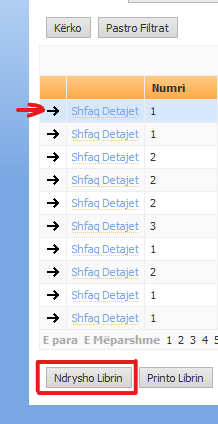
- Click on the “Books Submitted” section, select the period for which the book will be changed by clicking on the “→”, and after selecting the period you must click the “Change Book” button, as shown in the image below:
- Then proceed with uploading the revised book in Excel format and submitting it.
To change the purchase book, you must select the “Purchase Books” submenu and follow the other steps described above.
Source: General Directorate of Taxes.
Every time there is a tax or financial change that affects your business, we notify you directly by email with a practical explanation.
Send me free notifications