



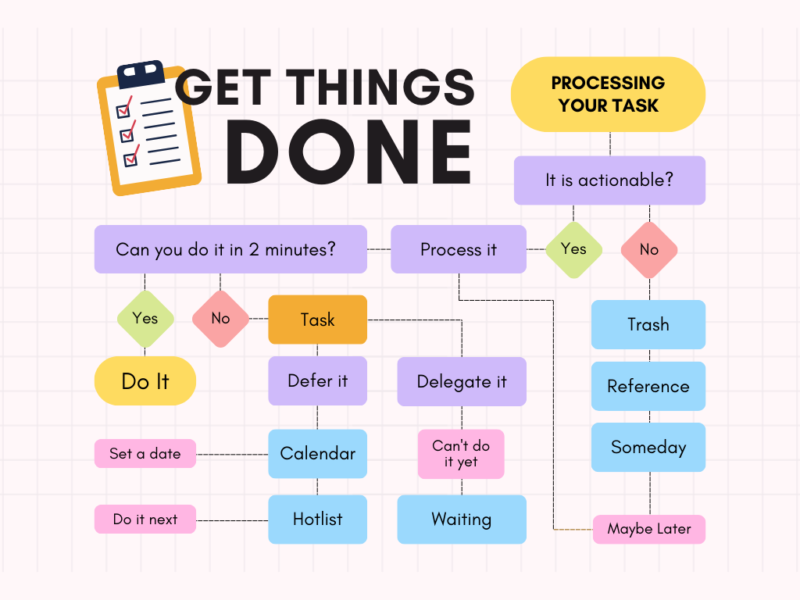
- David Allen's GTD method gets tasks out of your head and into a reliable external system.
- There are five steps: capture, process, organize, review, and execute, and six lists that keep the system running.
- The two-minute rule: any task that takes less than two minutes is done immediately.
- The weekly review, 30 to 60 minutes, is the step that keeps the system alive.
- Most people fail at the same three points: partial grasp, overlooked review, and to-do lists that never get acted on.
The GTD method, from the English "Getting Things Done," is David Allen's task management system, described in the book of the same name. The basic idea is that, instead of remembering everything, you get tasks out of your mind and into an external system you fully trust.
The key word is trust. The brain only lets go of a task when it's sure it won't get lost; otherwise it keeps bringing it back to mind, usually at two in the morning. Therefore, GTD isn't just a to-do list; it's the agreement you make with yourself that everything you've written down will be reviewed and addressed.
Read also: 5 books you should read
The five steps of the GTD method
Catching
Gather everything that demands your attention, without judgment, from a work task to an idea or a small reminder. The only rule is that capture must be complete—having half the tasks in the system and half in your head ruins the whole deal.
Processing
For every item captured, the same question is asked: does it require action? If not, it's either deleted, saved as a reference, or—maybe—added to the list someday. If it does, the two-minute rule applies: anything that can be done in two minutes is done immediately; the rest is either delegated or marked as the next action.
Organization
Each processed task goes on its own list, according to the table below. The detail that sets GTD apart from ordinary lists is that the project and the next action are kept separate: “presentation for the bank” is a project, “ask the economist for the six-month balance sheet” is the next action.
Review
Once a week, 30 to 60 minutes are spent going through all the lists. Completed items are closed, projects are updated, and everyone takes the next action. This is the step that keeps the system reliable.
Execution
Work on one task at a time, without distractions, until you finish it. Priorities have been set in the previous steps, so here you just work.
The six lists that keep the system running
| List | What does it hold? |
|---|---|
| Inbox | Everything freshly caught, still unprocessed. It's emptied every day. |
| Next steps | The next concrete step for everything, written as an action: “I call X about the offer.”. |
| Projects | Any outcome that requires more than one action. Every project always has a next action. |
| Waiting | What you have delegated or are expecting from others, with the date you requested it. |
| Calendar | Only those with fixed dates and times, meetings, and deadlines. Nothing else, so the calendar remains reliable. |
| Sometimes, maybe | Ideas with no deadline, the second store, the new course. They are reviewed once a month. |
What a week with GTD looks like for a small business owner
The owner of a small business simultaneously handles orders, payments, tax deadlines and employees, so GTD fits naturally. During the day, anything new—a supplier invoice, a client request, a bank notification—is captured in the inbox in two seconds without interrupting work.
In the evening or the next morning, the inbox is cleared using the two-minute rule. Quick payments are made on the spot; offers that require calculation are moved to the next steps; the document for declaration… is delegated to the economist and is moved to the waiting list.
On Friday, before closing, the weekly review is conducted. The deadlines for the coming week in the calendar are checked along with weekly cash control, The waiting list shows who needs to be reminded of something, and each project gets its next action. The new week starts with no tasks hidden in your head.
The delegation step is the one that owners most often forget. The real question isn't how to do everything, but who can do each thing best—an idea that the book Who Not How covers nicely. Finances and filings are the classic example of tasks that in GTD live in the waiting list, not in your work list.
Read also: Who Not How by Dan Sullivan, who, not how
Three mistakes where GTD fails
The first mistake is partial capture. When half the tasks are logged and half are kept in your head, your brain doesn't trust the system and keeps trying to remember everything, so the stress remains the same as with one more to-do list.
The second mistake is skipping the weekly review. Without it, lists become outdated within two weeks, completed tasks remain open, and the system turns into a second inbox that nobody ever opens again.
The third mistake is to-do lists without action. “To fix my finances” isn't an action, it's a wish. An action is “to schedule a meeting with the economist on Tuesday.” The more concrete the step, the more likely it is to get done.
To get started, you don't need any technology—just a notepad and a pen. Those who want to delve deeper can find the official materials at the Getting Things Done page, Our guide below explains how to build an entire business on systems.
Read also: From Chaos to Control: How to Build a Business That Works for You
Frequently asked questions
What is the GTD method?
The GTD method, Getting Things Done, is David Allen's system for managing tasks. Tasks are taken out of the mind, placed into an external system, and processed in five steps.
What are the five steps of GTD?
Capturing each task, processing it, organizing it into the system's six lists, reviewing it weekly, and executing one task at a time.
What is the two-minute rule?
Any task that can be completed in two minutes is done immediately, without even being written on the list. That way, the lists stay short and small tasks don't pile up.
Do I need any app for GTD?
No. The method works with a notepad and a pen. Apps help later, once the system has become a habit.
Why isn't GTD working for me?
Almost always for one of three reasons, the capture is partial, the weekly review is skipped, or the lists hold wishes instead of concrete next steps.
